TargetOppX
Stop replying to dead tweets. See which ones still have runway — right in your timeline.
The Problem
Most people reply to tweets based on gut feel — scrolling until something catches their eye. But by the time you see a tweet with 100K views, the question isn't “is this tweet popular?” — it's “does this tweet still have impressions left to deliver?”
A tweet with 100K views at 2 hours old is still climbing. The same tweet at 24 hours already peaked. One is a wave you can ride. The other is a wave that already broke. You can't tell the difference by looking.
TargetOppX can.
See It In Action
How It Works
Every tweet's impressions follow a predictable decay curve. TargetOppX reads each tweet's current views, age, and engagement metrics, then projects how many impressions are still coming.
The scoring model blends two decay curves based on real engagement signals — not just raw view counts. When a tweet's engagement rate confirms the algorithm is actively amplifying it, the model extends the projection window. When engagement is flat, it uses a tighter curve. The result: you see which tweets have genuine remaining opportunity, not just big numbers.
Built on real data, not vibes. The model is calibrated against actual X algorithm behavior using weighted engagement signals. Retweets, replies, and likes each carry different weight because they mean different things to the algorithm. It's not a guess. It's math.
Opportunity Tiers
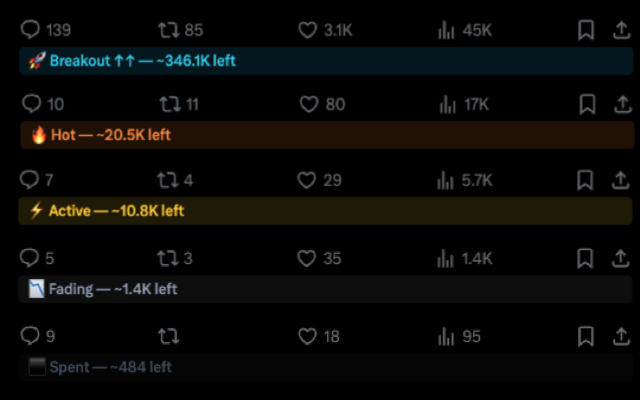
Every tweet in your timeline gets scored and badged instantly:
| Badge | Tier | Remaining | What to do |
|---|---|---|---|
| 🚀 | Breakout | 50,000+ | Drop everything. Reply now. |
| 🔥 | Hot | 15,000 – 50,000 | Strong opportunity. Quality reply warranted. |
| ⚡ | Active | 3,000 – 15,000 | Worth engaging if you have a good take. |
| 📉 | Fading | 500 – 3,000 | Only if you have something sharp. |
| ⬛ | Spent | < 500 | Skip. Opportunity is gone. |
Trajectory arrows show momentum: ↑↑ = viral trajectory, ↑ = elevated (outperforming average).
Timeline Filter
Toggle the filter to dim low-opportunity tweets and highlight the ones worth your time. Choose a minimum tier — everything below fades out. Dimmed tweets collapse but expand on hover so you can still peek.
Privacy
TargetOppX runs entirely in your browser. No data leaves your machine. No accounts, no tracking, no servers. The scoring model runs locally on every tweet you see.
Get Started
- Install from the Chrome Web Store
- Navigate to x.com — badges appear on every tweet
- Click the extension icon to toggle the filter and adjust settings
Feedback
Questions, bugs, or feature requests? DM @DoDataThings on X.